AI Movie Poster Generator
One photo in. A poster-grade portrait out. Upload one photo and get a cinematic movie poster: dramatic lighting, film-grade colour, vertical poster framing. Free with a Google sign-in.
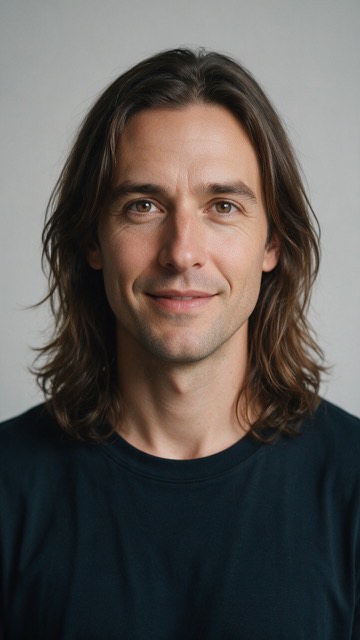
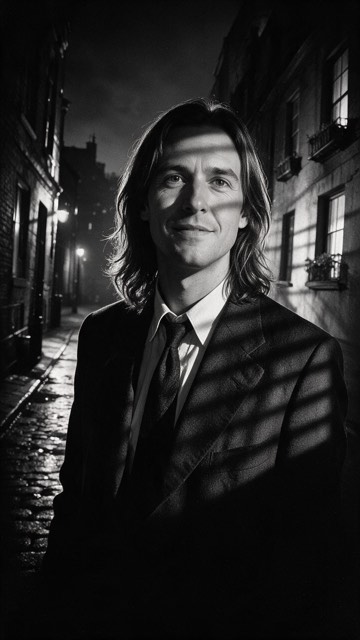
A real result from this generator, at the size it renders. The source portrait is AI-generated, not a real person.
Free with a Google sign-in. Your photo is sent to OpenAI for safety screening and to Volcengine or, if it fails, kie.ai for generation. We delete the upload from our database when processing ends, within three days. The finished image is saved so its link keeps working. See our Privacy policy for third-party retention and analytics.
AI Movie Poster Generator styles
Noir thriller
Black and white with hard, slatted shadows: the look of a 1940s detective one-sheet. With the colour gone, a busy background in your photo matters less.
Epic blockbuster
The summer-release look: a teal and orange grade, shafts of light and a sense of scale. It needs some shoulders in the photo to feel big.
Romance drama
Warm golden-hour light and a soft glow. Better suited to an anniversary or a birthday poster than to an action frame.
Suspense
Cold, drained colour, fog and a single hard light from behind. The one to pick for an October movie-night invite.
What people make with it
Party and farewell posters
Print it for a birthday, a leaving do or a retirement, or post it as the “now showing” card before the event. The lower third is left dark and empty on purpose so you can add a title, a date or a cast list in any photo editor. The generator is told to leave text out, so the title is yours to write.
Covers and profile images
The result is a tall 9:16 frame, so it drops straight into a story, a short-video cover or a phone wallpaper, and the top two thirds crop cleanly to a square avatar.
Why it recomposes instead of filtering
A filter would relight your photo and keep your T-shirt and the wall behind you. What makes an image read as a poster is new wardrobe, a new setting and a low camera angle, so that is what this generator asks the model for. Expect the pose and clothing to change; your face should not.
What makes the difference
One face, facing forward
Group shots split the model's attention and likeness suffers. Crop to one person if you can.
Even light on the face
Hard shadows across the face get baked in. Window light or open shade works well.
Shoulders in frame
The costume, suit or poster framing needs some body to work with, not just a head.
Skip heavy sunglasses and hats
Anything covering the eyes removes the strongest identity signal the model has.
AI Movie Poster Generator questions
Is the AI movie poster generator free?
Yes. Sign in with Google and it is free, with a small daily limit per person. Results come back at about 720x1280 (9:16) with no watermark.
Do I need to upload a specific kind of photo?
A clear, front-facing photo of one person works best. Good even lighting and a visible face give the model the most to work with. Group photos and heavy sunglasses reduce likeness.
What happens to my photo?
Your photo is used for safety screening and image generation. When moderation is enabled and configured, the whole photo is first sent inline to OpenAI (omni-moderation-latest). Volcengine renders the image, or kie.ai if Volcengine fails; kie.ai keeps a temporary upload for about three days. We delete the original from our database when processing finishes, fails or expires, within three days. We keep a job record, a salted IP hash and the result link. Third-party retention is governed by their own policies. The site also uses Plausible, Google Analytics 4 (GA4), Microsoft Clarity and Cloudflare Web Analytics, including cookies, session replays and a Cloudflare-injected cookieless performance beacon; see /privacy/ for details and deletion requests.
Can I use the poster commercially?
Check the provider's commercial-use policy for the model that produced your image, and make sure you hold rights to the source photo. This site does not grant rights to anything you upload.