80s AI Photo Generator
Big hair, shoulder pads, film grain. Still you. Turn one selfie into a photo that looks shot in 1985: mall-studio laser backdrop, family-album flash, neon night or yearbook portrait. Your face kept. Free with Google sign-in.
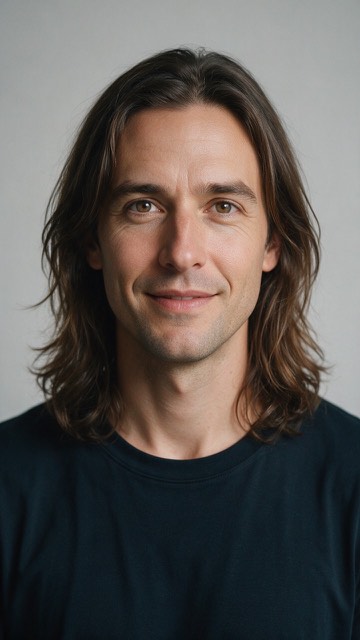
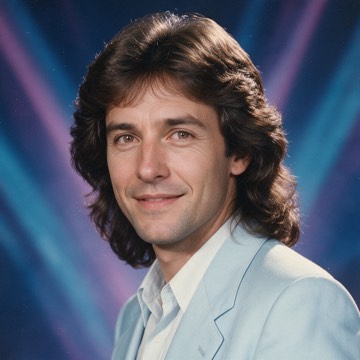
A real result from this generator, at the size it renders. The source portrait is AI-generated, not a real person.
Free with a Google sign-in. Your photo is sent to OpenAI for safety screening and to Volcengine or, if it fails, kie.ai for generation. We delete the upload from our database when processing ends, within three days. The finished image is saved so its link keeps working. See our Privacy policy for third-party retention and analytics.
80s AI Photo Generator styles
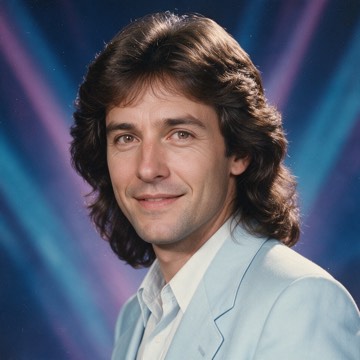
Mall studio
The laser backdrop, feathered hair and shoulder pads of a 1985 mall portrait studio. The look most people mean by “the 80s photo trend”.
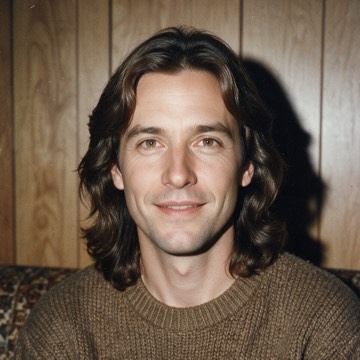
Family album flash
Direct flash, wood panelling and the warm, faded colour of a drugstore print. It looks like a page from your parents' photo album.

Neon night
Hot-pink and electric-blue neon on a wet street, with a denim or leather jacket. The synth-pop album cover version.
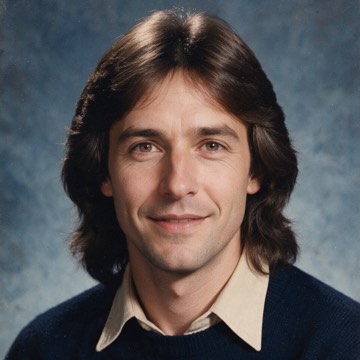
Yearbook portrait
A mottled blue backdrop, a straight-on pose and big hair. The AI yearbook look, made from a photo of an adult.
The 80s photo trend, done properly
Where the trend comes from
In September 2026 people started asking ChatGPT to show what they would have looked like around 1985, and the before-and-after pairs spread across Instagram and TikTok. This page does the same job with four looks tuned for it, and you do not need a ChatGPT account. It is an independent tool, not affiliated with OpenAI.
Why it looks like a real 80s photo
A sepia filter on a 2026 selfie still looks like 2026: the hair, the clothes and the phone-camera sharpness give it away. So the generator restyles your hair, outfit and setting for the decade and imitates film grain, soft focus and an old print's colour, while keeping your face.
What people do with it
Post the before-and-after, make a “born in the 80s” birthday invite, or run everyone in the group chat through the same look for a matching set. It is a square picture, so it also works as a profile picture.
Want a Halloween profile picture instead? Try the Halloween PFP generatorWhat makes the difference
One face, facing forward
Group shots split the model's attention and likeness suffers. Crop to one person if you can.
Even light on the face
Hard shadows across the face get baked in. Window light or open shade works well.
Shoulders in frame
The costume, suit or poster framing needs some body to work with, not just a head.
Skip heavy sunglasses and hats
Anything covering the eyes removes the strongest identity signal the model has.
80s AI Photo Generator questions
Is the 80s AI photo generator free?
Yes. Sign in with Google and it is free, with a small daily limit per person. Results are 960x960 squares with no watermark.
Is this the ChatGPT 80s photo trend?
It makes the same kind of picture: you as if photographed around 1985, with period hair, clothes and film colour. It is a separate, independent tool, not affiliated with OpenAI or ChatGPT, and you do not need a ChatGPT account or a prompt — upload one photo and pick a look.
Will it still look like me?
That is the goal. Your hair, clothes and background change to fit the decade; the prompt tells the model to keep your face, age and skin tone. A clear, front-facing photo holds likeness best.
Can I get the 80s yearbook photo look?
Yes. Pick Yearbook portrait for the mottled blue backdrop and straight-on pose. Upload a photo of one adult: photos of children are not accepted.
What happens to my photo?
Your photo is used for safety screening and image generation. When moderation is enabled and configured, the whole photo is first sent inline to OpenAI (omni-moderation-latest). Volcengine renders the image, or kie.ai if Volcengine fails; kie.ai keeps a temporary upload for about three days. We delete the original from our database when processing finishes, fails or expires, within three days. We keep a job record, a salted IP hash and the result link. Third-party retention is governed by their own policies. The site also uses Plausible, Google Analytics 4 (GA4), Microsoft Clarity and Cloudflare Web Analytics, including cookies, session replays and a Cloudflare-injected cookieless performance beacon; see /privacy/ for details and deletion requests.